

Most AI audience tools don't fail because they lack features—they fail because they don't help you make a decision. The tools that actually work in 2026 translate raw audience signals into outputs you can act on: segments, native language, objections, and direction priorities. Use an evaluation scorecard to pick tools by outcome, not by hype.
There are more "AI-powered audience" tools than ever. Most promise deep insights and real-time signals. But when you sit down to decide which segment to target or which message to test first—they leave you with a dashboard and no clear next step. 📊
Here's an honest breakdown of what separates the tools that work from the ones that waste your afternoon.
Why Most AI Audience Tools Disappoint
The real problem isn't technical—it's philosophical. Most tools are built to report, not to decide.
They aggregate mentions. They surface trending topics. They generate persona summaries. But they stop short of telling you: this segment has the highest intent signal, prioritize it first.
That's the gap between the information layer and the decision layer. Most tools live in the first one. The ones that actually work operate in the second.
Three patterns make a tool disappointing:
- It outputs summaries without a recommended action
- It shows sentiment without explaining motivation
- It segments by demographics instead of by job-to-be-done
If a tool can't help you answer "should we go, revise, or cut this direction?"—it's a reporting tool wearing the wrong badge.
The 5 Criteria That Predict Whether a Tool Will Actually Work
Before evaluating any AI audience tool, test it against these five criteria. They predict decision-usefulness better than any feature list.
- Criterion 1 — Segment/niche discovery quality. Does it identify specific high-intent niches, or just broad demographics? "Indie SaaS founders 60 days post-launch" beats "25–40-year-old males in tech."
- Criterion 2 — Native language extraction. Does it surface raw quotes and exact phrasing—not polished AI summaries? Copy written in your audience's own words converts. Generic copy doesn't.
- Criterion 3 — Message validation support. Can it help you test a claim, check proof availability, and surface objections before you write full assets?
- Criterion 4 — Direction/creative pre-screening. Does it help you rank multiple directions by likelihood of resonance—so you don't test everything at once?
- Criterion 5 — Time-to-value + setup cost. Can a lean team get a useful output within hours, without a three-week onboarding process?
A tool that scores well on all five is genuinely useful. Most score on two or three.
Scorecard Table: Evaluate Any Tool in 10 Minutes
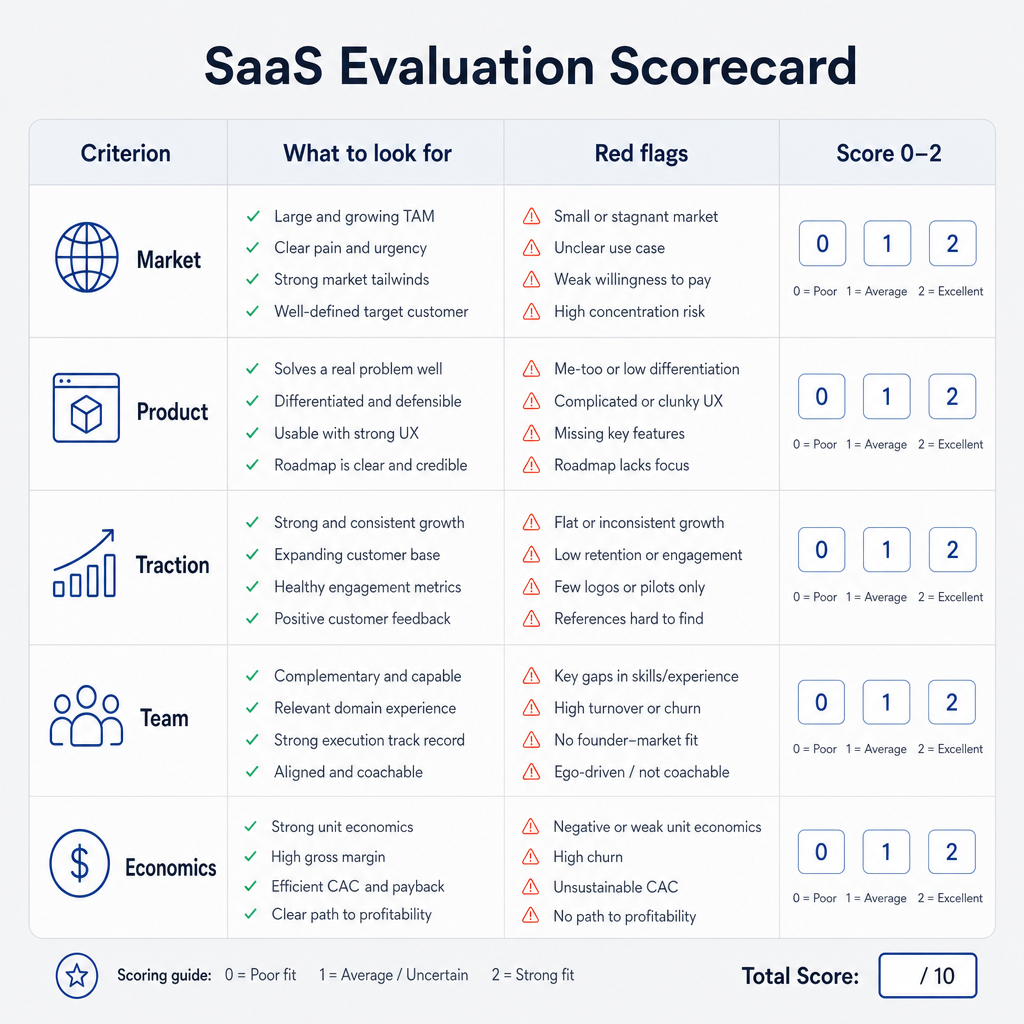
Score 0 (not present), 1 (partial), or 2 (strong) for each criterion.
| Criterion | What to look for | Red flags | Score (0–2) |
|---|---|---|---|
| Segment discovery | Specific niches, job-to-be-done clusters | Demographic-only output | __ |
| Native language extraction | Raw quotes, exact phrasing | Only polished AI summaries | __ |
| Message validation | Claim + proof + objections output | No objection surfacing | __ |
| Direction pre-screening | Ranked priorities, go/revise/cut output | Equal weight across all directions | __ |
| Time-to-value | Useful output within hours | Requires weeks of setup | __ |
A tool scoring 8–10 is decision-ready. 5–7 is useful with workarounds. Below 5—save your budget.
Tool Categories: What to Expect From Each
- Social listening — Best for monitoring brand conversations and tracking trends. Not designed for pre-launch decisions.
- Survey/panels — Great for quantifying assumptions. Slow to set up, and limited by the questions you already know to ask.
- Research ops (qualitative) — Deep and rigorous. High effort, slower cycles. Best for major strategic bets.
- Product analytics — Ground truth about in-product behavior. Useless before launch, gold after.
- Audience intelligence — Built for decisions: segment discovery, language extraction, message validation, creative pre-screening. Best fit for pre-launch and early-growth stages.
None of these is "the best tool." The right one depends on your decision type and time horizon.
A Realistic Try-First Workflow
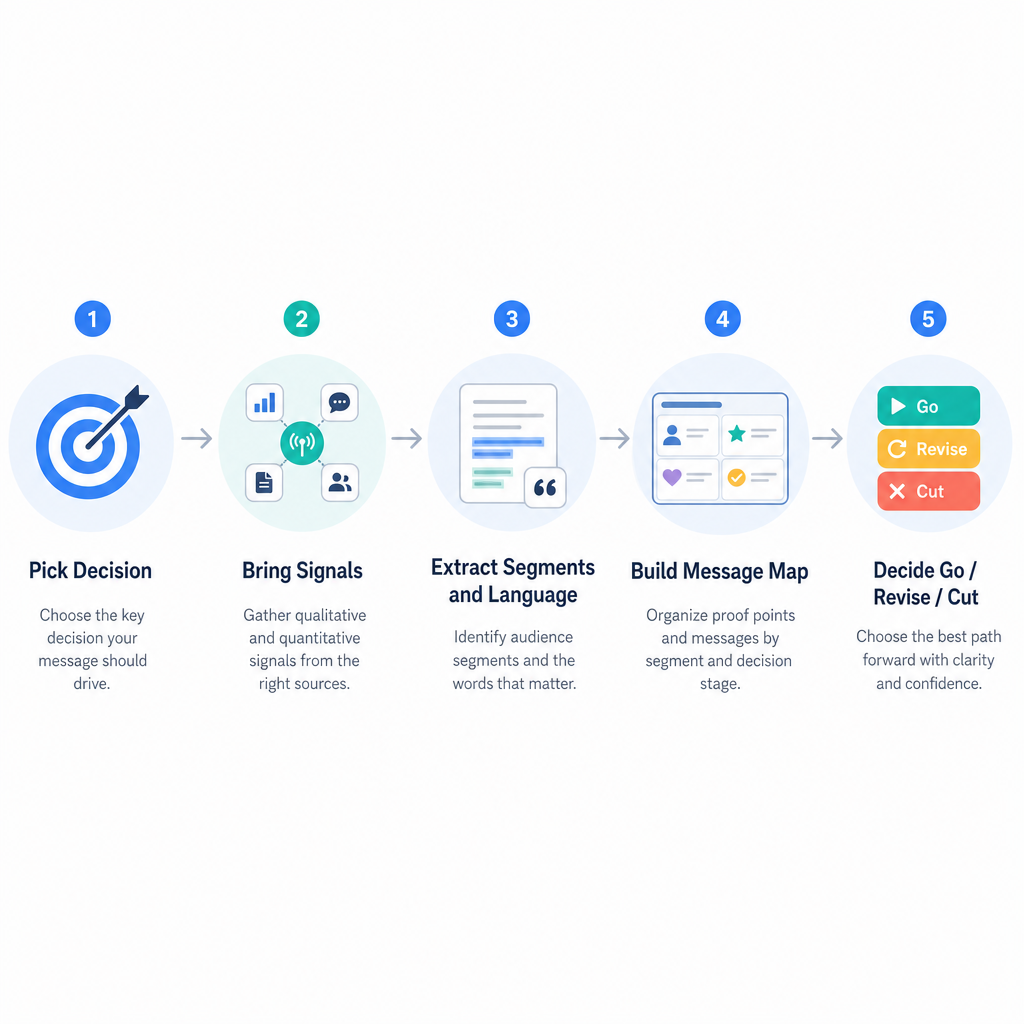
Before committing a week to any new tool, run this workflow first.
Step 1 — Pick one decision. 💡
Choose segment, message, or direction. Don't try to answer all three at once.
Tip: Write it as a testable statement: "We believe segment X will respond to message Y."
Step 2 — Bring 30–100 signals.
Community posts, competitor reviews, search queries, support tickets. Raw and unfiltered.
Tip: Prioritize sources where your audience expresses pain unprompted—Reddit threads, G2 reviews, niche Slack groups.
Step 3 — Ask for segments + native language + objections.
Don't just want clusters—want the exact phrases people use to describe the problem.
Tip: If the tool only gives polished copy, ask it to show raw quotes. Native language is the deliverable.
Step 4 — Produce one message map.
Claim → proof → likely objection. One page. One decision.
Tip: Keep it scrappy. A rough message map used in a test beats a polished one sitting in a doc.
Step 5 — Decide: go, revise, or cut.
That's the output. That's what all of this is for.
Tip: Time-box the decision. If you can't decide in 48 hours with these signals, you need different signals—not more of the same.
Where Klinko Fits (and Why It's Different)
Klinko is an AI audience growth console built specifically for the decision layer. It's not a monitoring dashboard. It doesn't do outbound. It doesn't publish content.
What it does: helps growth teams understand the audience, validate the message, evaluate the direction, and decide what's worth pursuing.
| Job to be done | Typical tool | Klinko |
|---|---|---|
| Monitor brand mentions | Social listening (Brandwatch, Sprout) | Not designed for this |
| Find high-intent segments | Manual research or personas | ✅ Core capability |
| Extract native language | Manual tagging or NLP tools | ✅ Core capability |
| Validate messages pre-launch | Survey tools or ad tests | ✅ Core capability |
| Pre-screen creative directions | Gut feel or expensive testing | ✅ Core capability |
| CRM / outbound / publishing | HubSpot, Apollo, Buffer | Not designed for this |
Common Pitfalls: Avoiding False Confidence
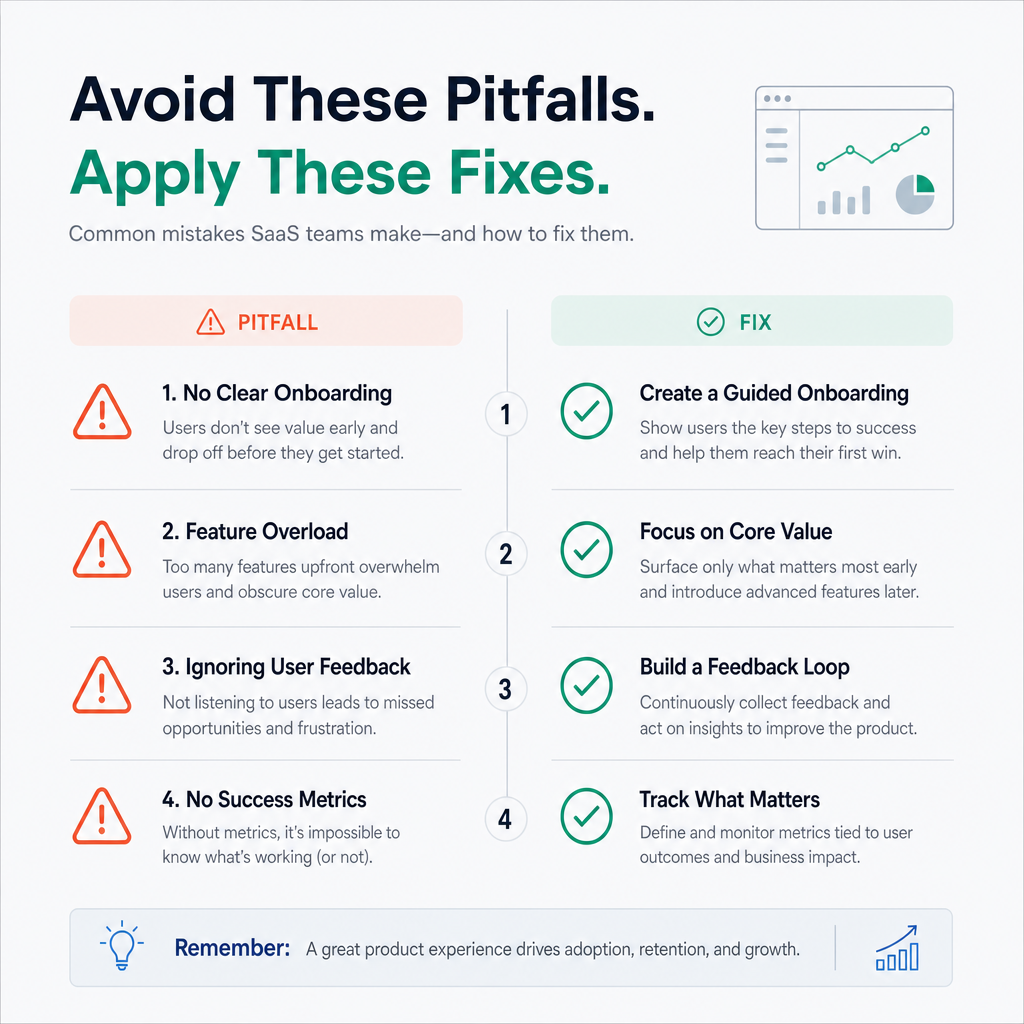
Even good tools can lead you astray.
- Over-trusting AI summaries. Always ask: what are the raw quotes behind this claim?
- Confusing sentiment with motivation. "People are frustrated" is sentiment. "People are frustrated because they can't explain ROI to their CFO" is motivation. Only one is actionable.
- Using generic personas. A persona without behavioral evidence is a guess with a name. Demand proof signals.
- Validating messaging with the wrong audience. If you validate a B2B SaaS message with a general consumer panel—it's worthless. Match validation audience to target segment exactly.
FAQ
Q: Are AI audience tools better than traditional research?
They're faster for early decisions. Deep research still matters for major strategic bets—but for pre-launch direction calls, AI audience tools dramatically reduce time-to-decision.
Q: What's the fastest way to know if a tool works?
Run the five-criterion scorecard and the try-first workflow in a single afternoon. If you can't get a useful output in one session—move on.
Q: Do I still need social listening tools?
Yes, for monitoring after launch. Social listening and audience intelligence are complementary. Use listening to gather signals; use intelligence to turn signals into decisions.
Q: What output should I demand from any AI audience tool?
At minimum: named segments with motivations, native language samples, top objections, and a ranked direction list. If it can't produce those four—it's a reporting tool, not an audience intelligence tool.
Ready to Stop Collecting Data and Start Making Decisions?
If you want an AI audience tool built around pre-launch decisions—not dashboards—try an audience intelligence workflow like Klinko. Designed to take you from raw signals to go/revise/cut in days, not weeks. Worth a look if your team's bottleneck is deciding what's worth pursuing next. 🎯

