

The best audience research tools in 2026 are not the ones with the most dashboards—they're the ones that match the decision you're trying to make. Growth teams typically need tools for three jobs: finding real audience segments, extracting native language, and validating messages and directions before spending budget. Use this shortlist by category, not by brand name.
Every week there's a new "AI-powered audience insights" tool. Most of them are fine. Most of them also won't help you decide what to do next. Here's how to cut through the noise. 🎯
A Quick Category Map: 5 Types of Audience Research Tools
Before evaluating any individual tool, understand which category it belongs to. Different tools solve different problems.
- Category 1 — Social listening / monitoring. Tracks mentions, sentiment, and trends across public channels in real time. Best for brand monitoring and competitive intelligence. Not designed for pre-launch decisions.
- Category 2 — Survey & panel research. Collects structured answers from defined audiences. Great for quantifying assumptions. Limited by the questions you already know to ask.
- Category 3 — Qualitative research ops. Interview scheduling, tagging, thematic analysis. High fidelity, high effort. Best for deep strategic bets.
- Category 4 — Product & behavioral analytics. Ground truth about what users actually do in-product. Essential post-launch, useless before it.
- Category 5 — Audience intelligence. Combines segment discovery, motivation extraction, native language analysis, and direction prioritization. Designed for decisions, not just reporting.
The mistake most teams make: buying a Category 1 tool and expecting it to do Category 5 work.
Comparison Table: Which Tool Type to Use for Which Decision
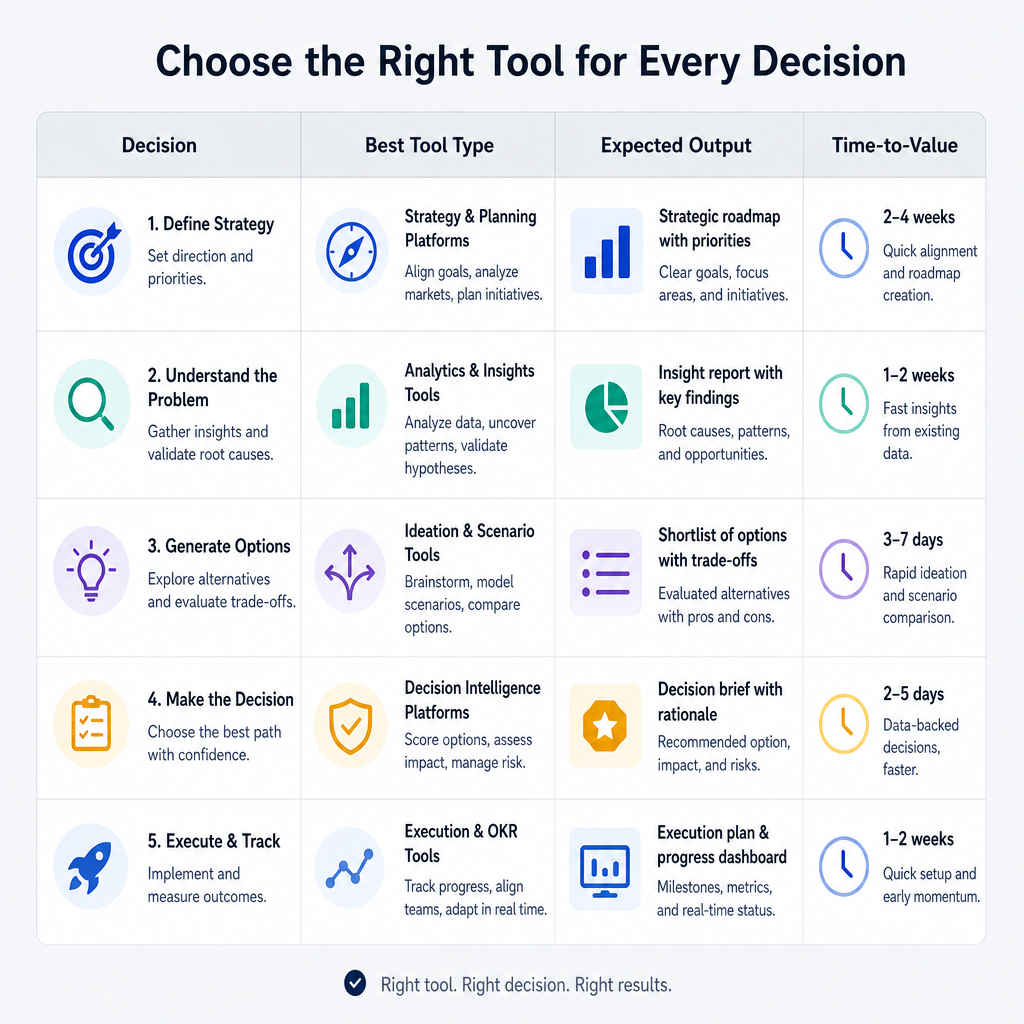
| Decision | Best tool type | Expected output | Time-to-value |
|---|---|---|---|
| Which segment to target? | Audience intelligence | Ranked segment map | Hours–days |
| What should we say? | Audience intelligence + survey | Message map + objections | Days |
| Which direction to test? | Audience intelligence | Go/revise/cut list | Days |
| What are users doing in-product? | Product analytics | Funnel + behavior maps | Real-time |
| What are people saying online? | Social listening | Sentiment + topic clusters | Real-time |
Top Tools by Category (2026 Updated Shortlist)
Social listening / monitoring
- Brandwatch — Enterprise-grade monitoring, strong competitive intel. High setup cost.
- Sprout Social — Good for SMBs, blends publishing with listening. Limited deep analysis.
- Mention — Lightweight, fast to start. Best for early-stage teams.
- Fast-start pick: Mention for small teams; Brandwatch when budget allows.
Survey & panel research
- Typeform — Smooth UX, ideal for warm audiences.
- Wynter — Built specifically for B2B message testing with panel targeting. Underrated.
- Google Forms — Free and surprisingly effective for quick directional questions.
- Fast-start pick: Wynter for B2B messages; Typeform for everything else.
Qualitative research ops
- Dovetail — Best-in-class for tagging and thematic analysis of interview data.
- Grain — AI-powered interview recording and highlight reels. Great for async teams.
- Fast-start pick: Grain for speed; Dovetail when doing 20+ interviews.
Product & behavioral analytics
- PostHog — Open-source, fast setup, strong for dev-resourced teams.
- Mixpanel — Powerful event tracking. Steeper learning curve.
- Amplitude — Best for mature products with complex funnel analysis.
- Fast-start pick: PostHog for early-stage; Amplitude when your funnel is complex.
Audience intelligence
- Klinko — AI-driven audience growth console for pre-launch decisions: segment discovery, language extraction, message validation, creative pre-screening.
- Fast-start pick: Klinko for teams that need to move from signals to decisions fast.
The "Native Language" Gap (and Why Most Teams Miss It)
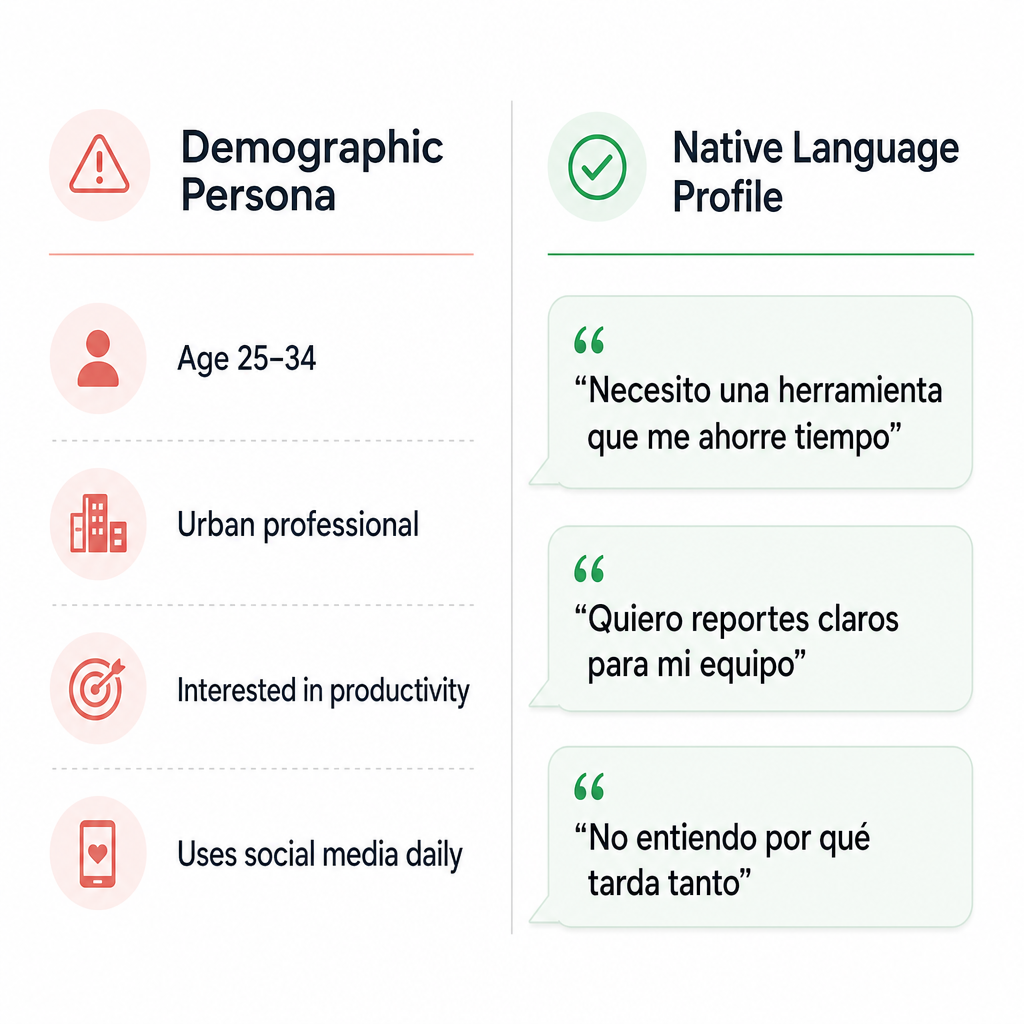
Your audience doesn't describe their problem the way your team does.
You write: "AI-powered workflow automation for modern teams."
They say: "I just need to stop doing the same thing in three different tools every morning."
That gap is why your landing page doesn't convert. Demographics don't close it. Native language does.
Native language mini-checklist:
- [ ] Do you have 30+ raw quotes from real audience members?
- [ ] Do you know the top 5 ways your audience describes the pain in their own words?
- [ ] Do you have a list of the top 10 objections your segment raises?
- [ ] Have you updated your landing headline with at least one native phrase?
If you can't check all four—you're leaving conversion on the table.
A Practical Selection Checklist (10 Minutes)
Step 1 — Define your decision.
Segment targeting, message validation, or direction testing? Write it in one sentence.
Tip: If you can't write the decision in one sentence, you're not ready to pick a tool yet.
Step 2 — Choose your evidence type.
Behavioral signals (what people do), attitudinal (what people say), or conversational (why people feel something)?
Tip: Pre-launch teams usually need attitudinal + conversational. Behavioral comes later.
Step 3 — Pick a time horizon.
Do you need an answer today, this week, or this quarter?
Tip: If you need an answer in 48 hours, eliminate any tool with a two-week onboarding process.
Step 4 — Decide your required output format.
Segment map, message comparison, ranked direction list, or dashboard?
Tip: If you can't describe the output format, you won't know if the tool succeeded.
Step 5 — Set a minimum viable workflow.
Commit to one workflow before expanding.
Tip: One decision + one tool + one week = a learning. That's the unit of progress.
Where Klinko Fits in the Stack
Klinko isn't trying to replace your social listening tool or analytics stack. Its job is specific: take you from raw audience signals to a clear decision about who to target, what to say, and what direction to pursue next.
- Niche/segment discovery — Find the high-intent clusters you'd miss with broad targeting
- Audience language extraction — Pull native phrasing and objections from real sources
- Message validation — Evaluate whether your claim maps to what your audience actually cares about
- Creative/direction pre-screening — Rank your directions before you spend on tests
Not a CRM. Not outbound. Not a publishing tool. It's for the decision phase—before you build or spend.
FAQ
Q: What's the difference between social listening and audience intelligence?
Listening monitors what's happening—volume, sentiment, mentions. Audience intelligence turns those signals into decisions about segments, language, and direction. One is a reporting layer; the other is a judgment layer.
Q: Do I need surveys if I already have social data?
Social signals help you discover language and motivations you didn't know to ask about. Surveys help you quantify assumptions. Start with raw signals before designing survey questions.
Q: What should a small team start with?
One decision + one workflow: segment + message validation before you create assets. A lean team that gets this right beats a well-resourced team that skips it.
Q: How do I know if a tool is actually "worth it"?
Simple test: did it reduce wrong experiments and speed up your go/revise/cut decision? If yes—worth it. If it just gave you more data to look at—it's not.
The Right Tool for the Right Decision
If your bottleneck is figuring out what's worth building or saying next, start with an audience intelligence workflow that outputs clear priorities. Klinko is designed for that exact job—turning signals into decisions before you spend time and budget on the wrong direction. 🎯


